I was reading an article recently on Modern Mrs. Darcy where one of the staff members mentioned that she tracks her reading in a spreadsheet.
Immediately my brain did the thing it always does when spreadsheets appear on the horizon.
Oh. Word Raccoon and I could do that.
Not because I don’t already track my books. I do. I use Goodreads like many readers do, and it works perfectly well for keeping a list of what I’ve read and what I want to read, but not much more. (Also: it’s way overdue for a facelift.)
But spreadsheets…
Spreadsheets are a different creature entirely. Word Raccoon is all about the spreadsheets!
Several people in the comments under that article mentioned pre-made reading spreadsheets. Someone recommended a free one from Book Riot. Others said there are elaborate ones you can buy on Etsy with charts and genre breakdowns and colorful dashboards.
All of which is lovely.
But here’s the thing.
Spreadsheets are actually very easy to make.
Even if you only have a perfectly average level of spreadsheet skill (which is where I would place myself), they’re wonderfully flexible. You can add columns. Delete columns. Drag them around. Reorder them when your brain decides a different structure makes more sense.
That flexibility is the real appeal to me.
Because once you start thinking about it, you realize you might want to track more than just books read.
You might want to note things like:
• where you heard about the book
• why you picked it up
• whether you finished it
• what mood you were in when you started
• whether it made you want to write
• whether you’d read the author again
Suddenly the spreadsheet becomes less of a list and more of a little reading laboratory.
Now, I realize this probably sounds very organized.
Which is ironic, because as a writer I am absolutely a pantser.
I don’t outline much. I discover things while writing. My notebooks tend to look like the aftermath of a minor literary tornado.
And yet I love spreadsheets.
A spreadsheet is just a quiet little grid where patterns begin to appear.
You might discover that every book you adore has a slightly strange narrator. Or that you keep reading winter novels. (Nope!) Or that every time you read a certain author you suddenly want to write for six hours. (Sometimes.)
Those kinds of patterns are revealing.
Naturally, Word Raccoon became extremely interested in this idea.
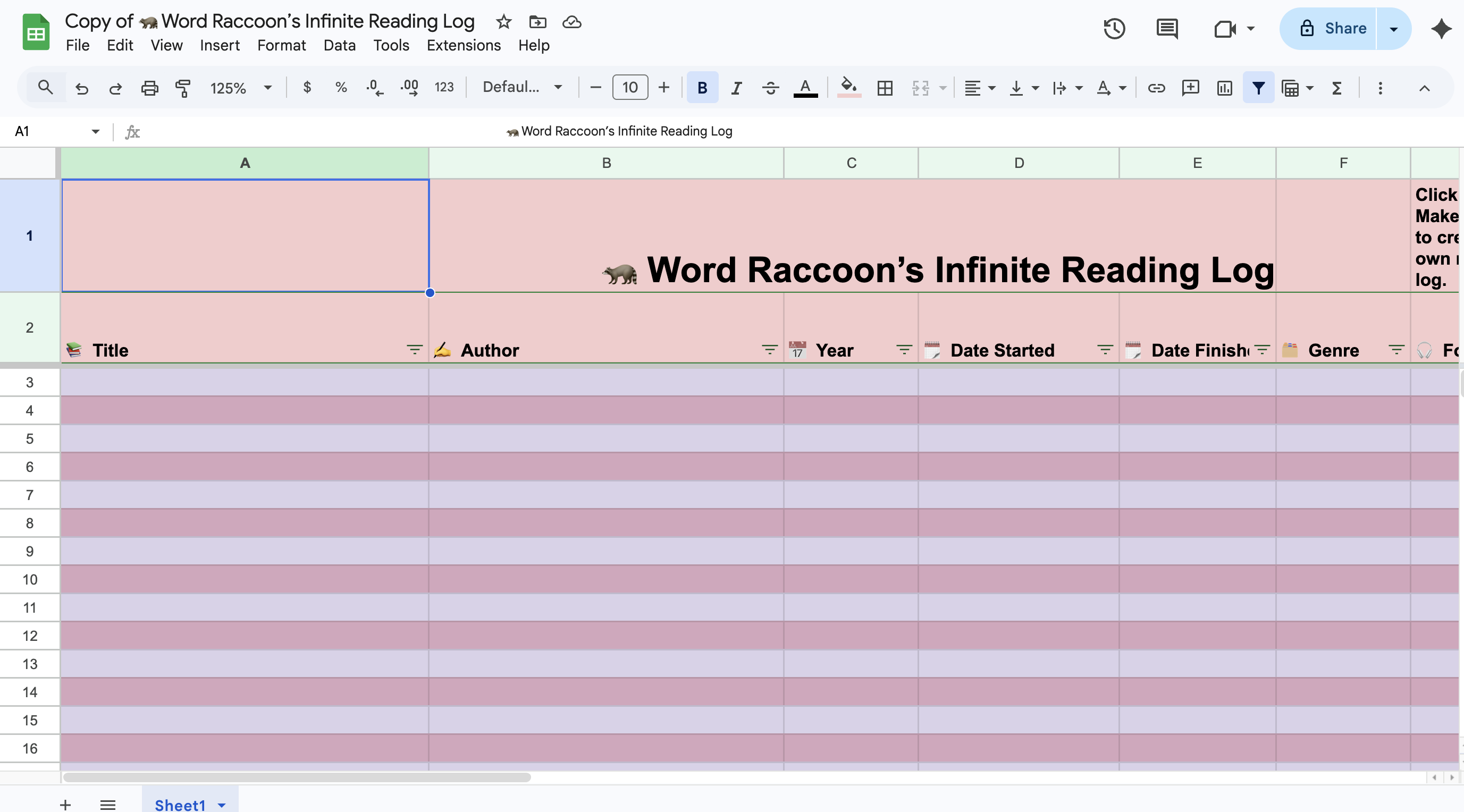
Which is how Word Raccoon’s Infinite Reading Log came into being.
It’s a simple spreadsheet that lets you track a bit more of the experience of reading, not just the title and author.
Things like:
📚 Title
✍️ Author
🗂 Genre
🗓 Date started and finished
⭐ Rating
💬 Would you recommend it
And Notes. Obviously.
For example, Word Raccoon might add:
🦝 “Suspicious number of soup scenes.”
🦝 “Why did no one warn me about chapter twelve and where is the chocolate?”
🦝 “Made me want to write immediately.”
🦝 “Word Raccoon believes this character should have made different choices.”
The beauty of spreadsheets, of course, is that you can add whatever columns you want. Or delete them, if they’re annoying.
Want to track seasonal reading moods? Go ahead.
Want a column titled “Why Would Anyone Recommend This”?
Perfectly reasonable.
WR recommends adding a column that says “Ate every page after reading.”
If you’d like to try it yourself, I made a starter version of Word Raccoon’s Infinite Reading Log that you’re welcome to copy and adapt. Consider it a flexible little tool for curious readers and mildly obsessive note-takers.
(Google will ask you to sign in so it can save a copy to your own Drive.)
Word Raccoon strongly encourages customization. Add the year to your copy. Move a column wherever you please. (WR changes her mind on where she wants things all the time.) Create a new sheet within it that is reading adjacent, like maybe “best snacks for reading” or music playlist suggestions.
Books may end.
But the reading list is infinite.
Careful: if you leave a spreadsheet open long enough, Word Raccoon will absolutely start adding columns. You’ll want to watch out for that.
🦝📚📊
P.S. I forgot to add Dear Hank & John to my favorite podcast list! On it they answer listener questions while providing updates on AFC Wimbledon (John) and Mars (Hank, obviously), plus fake sponsor bits that may be the best part of the show. Fun. Informative. Sometimes unexpectedly deep.
 dremadrudge.com